


In the realm of digital accounting and inventory management, precision is paramount. For businesses managing stock—whether it’s raw materials, tools, or finished commercial goods—tracking the specific inflow and outflow of every item is a critical task. This is where the Detailed Ledger for Materials, Tools, Products, and Goods (often referred to as the Inventory Sub-Ledger or Stock Card) becomes an indispensable tool.
This ledger is designed to monitor the detailed fluctuation of assets associated with specific accounting codes, such as Account 152 (Raw Materials), 153 (Tools & Supplies), 155 (Finished Goods), and 156 (Merchandise). By digitizing this process in Excel, accountants and warehouse managers can ensure accuracy, streamline reporting, and maintain a real-time view of inventory health.
This guide will walk you through the structure of the ledger, how to input data correctly, and provide a practical example of handling invoices within Excel.
Understanding the Structure of the Ledger
The core purpose of this ledger is to track the “Import” (Receipt), “Export” (Issue), and “Inventory” (Balance) status of individual items. It is crucial to note that each specific type of material, product, or good must be tracked on its own separate ledger sheet. This granularity prevents data conflation and allows for precise auditing.
Below is the standard Excel template used for this specific accounting task. It is designed to capture all necessary financial and logistical data points.
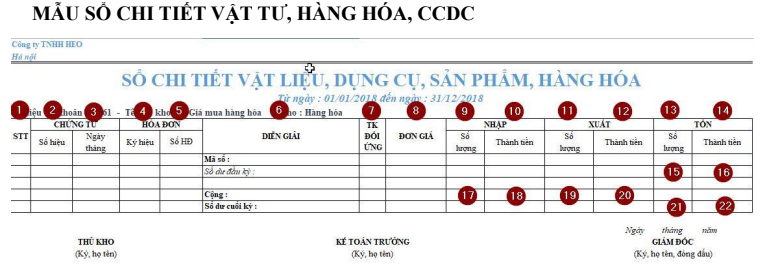 Blank Excel template for detailed inventory ledger showing columns for vouchers, descriptions, and stock values
Detailed Column Recording Instructions
To maximize the utility of Excel, data must be entered consistently. Here is a breakdown of the 22 standard columns found in the Detailed Ledger and how to populate them correctly:
General Information & Vouchers
- No. (STT): The ordinal number of the entry line.
- Voucher Number: The reference number of the internal slip (Import Slip or Issue Slip).
- Voucher Date: The exact date the transaction occurred (and was recorded on the voucher).
- Invoice Symbol: The serial/series symbol of the VAT invoice (if applicable).
- Invoice Number: The specific number of the VAT invoice accompanying the goods.
- Description: A concise summary of the economic transaction (e.g., “Import steel from Song Da Co.”).
Transaction Details
- Corresponding Account: The contra-account used in the double-entry bookkeeping system (e.g., corresponding with Account 331 – Payables to sellers).
- Unit Price: The cost per unit of the material or good. Note: Ensure your Excel cell formatting allows for necessary decimal places.
Import (Receipt) Section
- Import Quantity: The actual physical count of goods entering the warehouse.
- Import Value: The total monetary value of the imported goods (Formula:
Quantity * Unit Price).
Export (Issue) Section
- Export Quantity: The physical count of goods leaving the warehouse.
- Export Value: The total monetary value of the issued goods.
Balance (Inventory) Section
This section is dynamic and should ideally be calculated using Excel formulas to update automatically after every transaction.
- Remaining Quantity: The running total of physical stock.
- Remaining Value: The running total of stock value.
Summary Metrics
- Opening Quantity: Stock count at the beginning of the accounting period.
- Opening Value: Stock value at the beginning of the accounting period.
- Total Import Quantity: Sum of all imports in the period.
- Total Import Value: Sum of all import values in the period.
- Total Export Quantity: Sum of all exports in the period.
- Total Export Value: Sum of all export values in the period.
- Closing Quantity: Final stock count (Opening + Import – Export).
- Closing Value: Final stock value.
Practical Example: Recording a Purchase Invoice
To visualize how this works in a real-world scenario, let’s analyze a specific transaction.
Scenario: On January 2, 2018, your company purchased goods from Song Da Company. The transaction is detailed in Invoice No. 567 (Symbol SD/17P). The payment has not yet been made. The total value is 110,000,000 VND (inclusive of 10% VAT).
Here is the sample invoice provided by the supplier:
 VAT invoice sample from Song Da Company listing construction steel and cement
Analysis of the Invoice
The invoice lists two distinct items:
- Steel (Phi 16): 5,000 kg.
- Cement (PCB 30): 50,000 kg.
Technical Note: Because the ledger requires a separate sheet for each item type, you cannot record both these items on the same table. You must split the data into two distinct ledger sheets: one for the Steel and one for the Cement.
The Role of Excel Skills in Accounting
While modern accounting software exists, Excel remains the backbone of data verification and ad-hoc analysis. Proficiency in Excel functions—such as VLOOKUP for pricing, SUMIF for aggregating totals, and VBA for automating repetitive entry tasks—is essential for any accountant or inventory manager.
Visualizing data flow and mastering keyboard shortcuts can significantly reduce the time spent on these ledgers.
 Animation showing Excel spreadsheet manipulation and formatting techniques
For those dealing with massive datasets, understanding macros and VBA (Visual Basic for Applications) allows you to automate the creation of these ledgers, moving data from a general journal to specific stock cards instantly.
 Animated demonstration of VBA code execution in Excel for automation
Solution: The Completed Ledger Entries
Based on the Song Da Company invoice analyzed above, here is how the data should be recorded in the respective Excel sheets.
1. Ledger for Item: Steel (Phi 16)
We record the date (02/01/2018), the invoice details (SD/17P, #567), and the import quantity of 5,000 kg. The unit price is derived from the invoice (before tax).
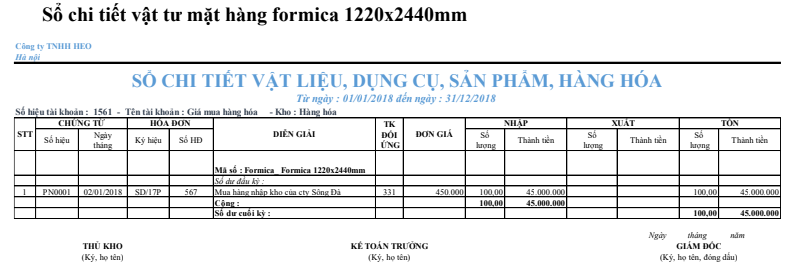 Completed Excel ledger entry for Phi 16 steel showing import quantity and value
2. Ledger for Item: Cement (PCB 30)
Similarly, a separate sheet is created for the Cement. Note that the “Corresponding Account” helps track the liability (Account 331) since the example stated the goods were purchased but not yet paid for.
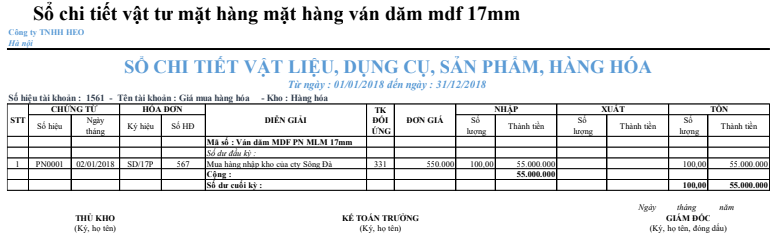 Completed Excel ledger entry for PCB 30 cement showing import calculations
Conclusion
Mastering the Detailed Ledger for Materials, Tools, and Goods is a fundamental skill for ensuring inventory accuracy and financial transparency. By utilizing Excel effectively, you can transform a tedious manual process into a streamlined, automated workflow. Remember the golden rule: separate items require separate ledgers to maintain data integrity.
Whether you are a student, a novice accountant, or a business owner, setting up these templates correctly is the first step toward professional inventory management.
References
- Microsoft Excel Support & Training Center.
- General Department of Taxation (Vietnam) – Regulations on Accounting Vouchers.
- Excel for Accountants – Best Practices Guide.









Discussion about this post