


Excel remains an indispensable tool in the field of accounting, acting as the bridge between raw data entry and sophisticated financial reporting. While specialized accounting software is prevalent, the flexibility of Excel allows professionals to audit data, perform ad-hoc analysis, and understand the underlying logic of financial statements.
Following our previous discussion on fundamental functions, this article delves deeper into advanced formulas specifically tailored for General Accounting. We will explore how to manipulate data arrays and text strings to automate the creation of General Ledgers and Trial Balances.
1. The MAX Function
In general mathematics, the MAX function is simple: it identifies the largest number in a set. However, in the context of accounting, it serves a critical logical role, particularly when calculating ending balances.
Syntax:
=MAX(number1, [number2], ...)
Practical Application:
The most common use case for MAX in accounting is handling Ending Balances in the “Trial Balance” or “General Ledger”.
When determining the balance of a T-account, an asset account (Debit nature) typically has a formula like: Opening Debit + Incurred Debit – Incurred Credit.
However, accounting displays usually separate Debit Balances and Credit Balances into two columns. A Debit balance cannot be negative in the Debit column; if the calculation is negative, it should appear as zero (and the value would move to the Credit column).
Instead of using a complex IF statement, accountants use MAX to ensure non-negative reporting:
=MAX(0, Opening_Balance + Debit_Turnover - Credit_Turnover)
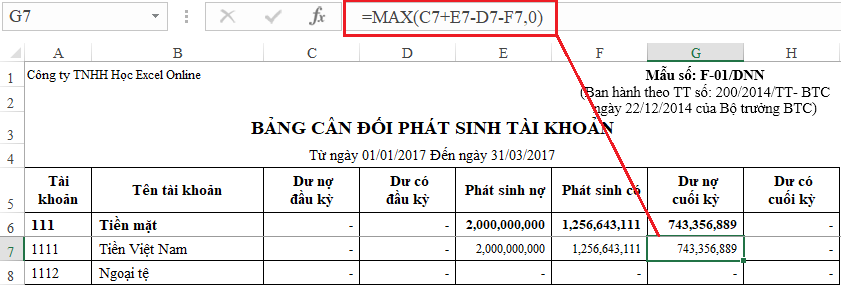 Screenshot of Excel spreadsheet showing the MAX function applied to calculate ending balances in a Trial Balance
This method ensures that if the result is negative (indicating the balance has flipped sides), the cell simply returns 0, keeping the report clean and accurate.
2. The SUMPRODUCT Function
Often referred to as the “Swiss Army Knife” of Excel formulas, SUMPRODUCT is a powerful alternative to SUMIFS and COUNTIFS, especially when dealing with legacy data structures or complex array calculations without requiring Array Formulas (Ctrl+Shift+Enter).
Syntax:
=SUMPRODUCT(array1, [array2], ...)
Practical Application:
In General Accounting, SUMPRODUCT is invaluable for calculating the Period Turnover (Total Incurred Amounts) for accounts in the Trial Balance.
Unlike SUMIFS, which requires ranges to be strictly defined, SUMPRODUCT can process arrays algebraically. It is particularly useful when you need to sum transaction values from the General Journal based on multiple conditions, such as:
- Matching the Account Code (e.g., Account 111).
- Matching the Date range.
- Handling both Level 1 (Parent) and Level 2 (Child) accounts simultaneously.
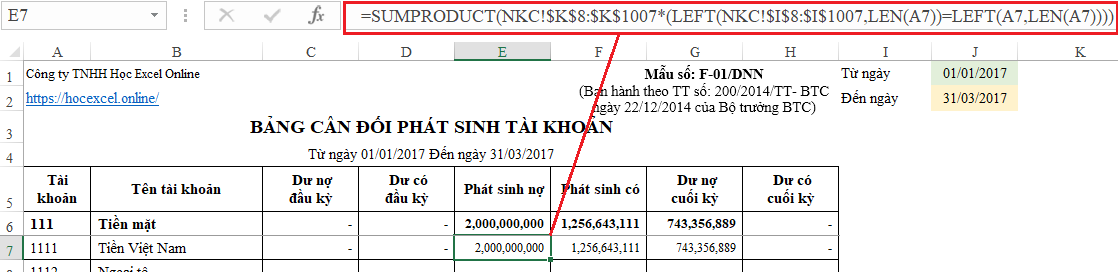 Excel interface displaying the SUMPRODUCT function arguments for calculating total transaction amounts based on account criteria
By multiplying logical arrays (True/False interpreted as 1/0) with the value array, SUMPRODUCT can aggregate complex financial data accurately across thousands of rows in a General Journal.
3. The LEFT Function
Text manipulation is crucial when dealing with Chart of Accounts codes. The LEFT function allows accountants to categorize and aggregate data based on the hierarchy of account numbers.
Syntax:
=LEFT(text, [num_chars])
Practical Application:
In many accounting systems (such as the Vietnamese Accounting System – VAS), account codes are hierarchical:
- Level 1: 3 digits (e.g., 111 – Cash on Hand)
- Level 2: 4 digits (e.g., 1111 – VND Cash)
The LEFT function is used to:
- Extract the “Parent” account code from a transaction list.
- Group sub-accounts for summary reporting.
- Advanced Combo: Combine
LEFTwithSUMPRODUCT. You can sum all transactions where the first 3 characters of the account code match “111”, regardless of whether the specific entry is recorded as “1111” or “1112”.
 Animated banner illustrating an Excel training course for accounting professionals
4. The LEN Function
While simple, the LEN function acts as a vital quality control mechanism in financial spreadsheets.
Syntax:
=LEN(text)
Practical Application:
This function measures the length of a text string. In accounting, it is used to:
- Distinguish Account Levels: By calculating the length of an account code, you can automatically determine if it is a Level 1 account (Length = 3) or Level 2 account (Length > 3).
- Data Validation: Ensure data integrity by highlighting account codes that do not meet the standard length requirements (e.g., a typo resulting in a 2-digit code).
- Formula Logic: It is often nested inside
IFfunctions to apply different formatting or calculation rules depending on the account hierarchy.
Conclusion
Mastering these four functions—MAX, SUMPRODUCT, LEFT, and LEN—elevates an accountant’s ability to handle data efficiently. While MAX ensures the logic of your balances is mathematically sound, SUMPRODUCT provides the heavy lifting for data aggregation. Meanwhile, LEFT and LEN offer the necessary text manipulation to manage complex Charts of Accounts.
By combining these functions, you can build dynamic, automated financial reports that update instantly as new data is entered into the General Journal.
References
- Microsoft Support: Excel Functions (MAX, SUMPRODUCT, LEFT, LEN)
- Corporate Finance Institute: Excel for Accounting
- Investopedia: General Ledger & Trial Balance Basics












Discussion about this post