

![[Course Review] Building a Smart Production Management System with Google Sheets, Apps Script, and QR Codes](https://thuthuat.com.vn/wp-content/uploads/2025/04/khoa-hoc-quan-ly-san-xuat.png "[Course Review] Building a Smart Production Management System with Google Sheets, Apps Script, and QR Codes")
In the modern era of manufacturing and logistics, small to medium-sized enterprises (SMEs) often face a dilemma: invest heavily in expensive Enterprise Resource Planning (ERP) software or struggle with manual paper trails. However, there is a third, highly efficient path. By leveraging the power of Google Sheets, Google Apps Script, and QR Code technology, businesses can build a “small but mighty” production management system for free.
This article introduces a specialized course designed to guide you through creating a lightweight, automated management system that rivals paid software in functionality and beats them in cost-effectiveness.
The “No-Cost” Tech Stack for Production Management
Before diving into the course details, it is essential to understand the technical architecture you will be mastering. This solution utilizes three core components to digitize the production line:
1. Google Sheets: The Cloud Database
More than just a spreadsheet, Google Sheets acts as the central database for your inventory and production stages. It offers real-time synchronization, allowing managers to view production status from any device, anywhere.
- Role: Stores product data, timestamps, employee IDs, and status updates.
2. Google Apps Script (GAS): The Automation Engine
This is the “brain” of the operation. Google Apps Script is a cloud-based JavaScript platform that lets you integrate and automate tasks across Google products.
- Role: It processes data sent from QR scans, automatically timestamps entries to prevent fraud, and triggers alerts or updates inventory levels without manual input.
3. QR Codes: The Physical-to-Digital Bridge
QR Codes eliminate the need for manual data entry, which is prone to human error.
- Role: Each product or batch is assigned a unique QR code. When scanned at a workstation, the system instantly identifies what the item is and where it is in the production cycle.
What You Will Learn in This Course
This course is practical and project-based. Instead of abstract theory, you will build a functional system step-by-step. The curriculum focuses on empowering you to use free tools to solve expensive problems.
Key Learning Outcomes:
- System Architecture: How to structure your Google Sheet to handle production data efficiently.
- Scripting Logic: Writing Google Apps Script to handle input events (scans) and manipulate spreadsheet data automatically.
- QR Implementation: Generating QR codes for products and setting up a scanning interface (using mobile devices as scanners).
- Dashboarding: visualizing the data to track bottlenecks and production speed.
Visualizing the Final Product
To truly appreciate the efficiency of this DIY solution, you need to see it in action. The following video demonstrates the workflow you will be able to build by the end of this course. Watch how a simple scan updates the Google Sheet instantly:
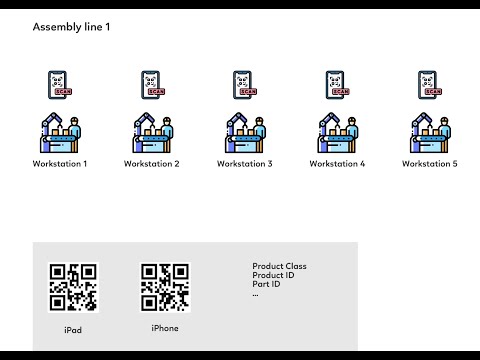 Production Management with Google Sheets and QR Codes
Video: A demonstration of the Google Sheets and QR Code management system in a live production environment.
Why Choose This Approach?
For tech enthusiasts and manufacturing managers in Vietnam, mastering this workflow offers significant advantages:
- Zero Licensing Fees: Utilizes the free Google Workspace ecosystem.
- Customizability: Unlike rigid boxed software, you can modify the script and sheets to fit your specific manufacturing process.
- Scalability: Start small with one production line and scale up as your familiarity with Apps Script grows.
Conclusion
Technology does not always require a massive budget; it requires ingenuity. This course on applying Google Sheets, Apps Script, and QR Codes is an excellent resource for anyone looking to digitize their production management process without breaking the bank. Whether you are a factory owner, a warehouse manager, or a developer looking to expand your toolkit, this practical knowledge is invaluable.
For more details on the curriculum and to enroll in the program, please refer to the course registration page.
References:
- Google Apps Script Documentation
- Course Introduction Video (YouTube)











Discussion about this post